
Over the years I’ve tried most of the (After)Shokz models. I started off with the Air, then went on to the Aeropex, as well as the OpenMove and the OpenRun Pro, which are all open-ear bone conduction headphones.
Now Shokz is introducing something new, the OpenFit, which are not only their first earbuds, but also their first product without bone conduction. They are closer to regular in-ear earbuds since they also transport the sound through the air, but it doesn’t go inside your ear canal. It is still an open-ear product.

When you buy the OpenFit you get two earbuds (one left and one right), a charging case, a USB-C charging cable and a user guide.

The OpenFit uses DirectPitch technology that sends the sound towards your ear canal and tries to cancel out the sound waves that go in other directions to avoid sound leakage. It still leaves your ear canal open to hear your surroundings. However the speaker part of the earbuds do sit inside your ear, in the concha, but doesn’t block your ear canal. Since the sound still goes through the ear the sound still goes via your eardrum and thus the OpenFit is less suitable for people with hearing loss. They are probably better off with one of the bone conduction headphones.
But since the OpenFit uses a different technology it also means that they sound much closer to regular in-ear earbuds, bone conduction does sound a little bit different since it goes through your bone. Just like you hear your own voice a little differently than someone else does. Because the OpenFit uses a different technology, comparing it to the other Shokz products is a bit like comparing apples to oranges.

But like almost anything else in this world, the OpenFit has its pros and cons.
Pros:
+ Sound: The sound quality is definitely better than bone conduction, the bass is better and the sound is also louder and richer, so I don’t have to turn up the volume as high in these as I would with my bone conduction headphones.
+Weight: They are light, each earbud weighs about 8 grams. Although the Shokz bone conduction headphones are not very heavy either, coming in at around 30 grams.
+ Charging: I like the charging case, the earbuds click into place magnetically and when you are not using your headphones they are getting charged and while you are wearing the headphones you can charge the charging case, so technically you’d never run out of battery this way. The earbuds themselves have a battery life of about 7 hours and the charging case can charge them a few times, so you’d have 28 hours of battery with the charging case. The OpenFit also has a quick charging function where 5 minutes gives you about an hour of audio.

The OpenRun and OpenRun Pro have an 8 and 10 hour battery which is more than enough for a long run and they have a fast charging function that would give you about an hour of charge if you charged them for 5 minutes, but in some cases you could still run out of battery if you didn’t charge them in time. Of course the same could happen with the earbuds, but it is even less likely.
+ EQ settings: Just like with the bone conduction headphones there are several EQ settings, but you can only change them in the Shokz app. There are 4 EQ modes: standard, vocal mode, bass mode and treble mode, but you can also create your own if you don’t like the existing ones.
+ Fit: They do stay in your ears, even though they don’t always feel like they will because their grip is a bit less tight than the bone conduction products. They do even stay in place while running and I can also wear them with sunglasses. I sometimes have the feeling that they might fall out, but so far it hasn’t happened yet and at this point I don’t think they will.
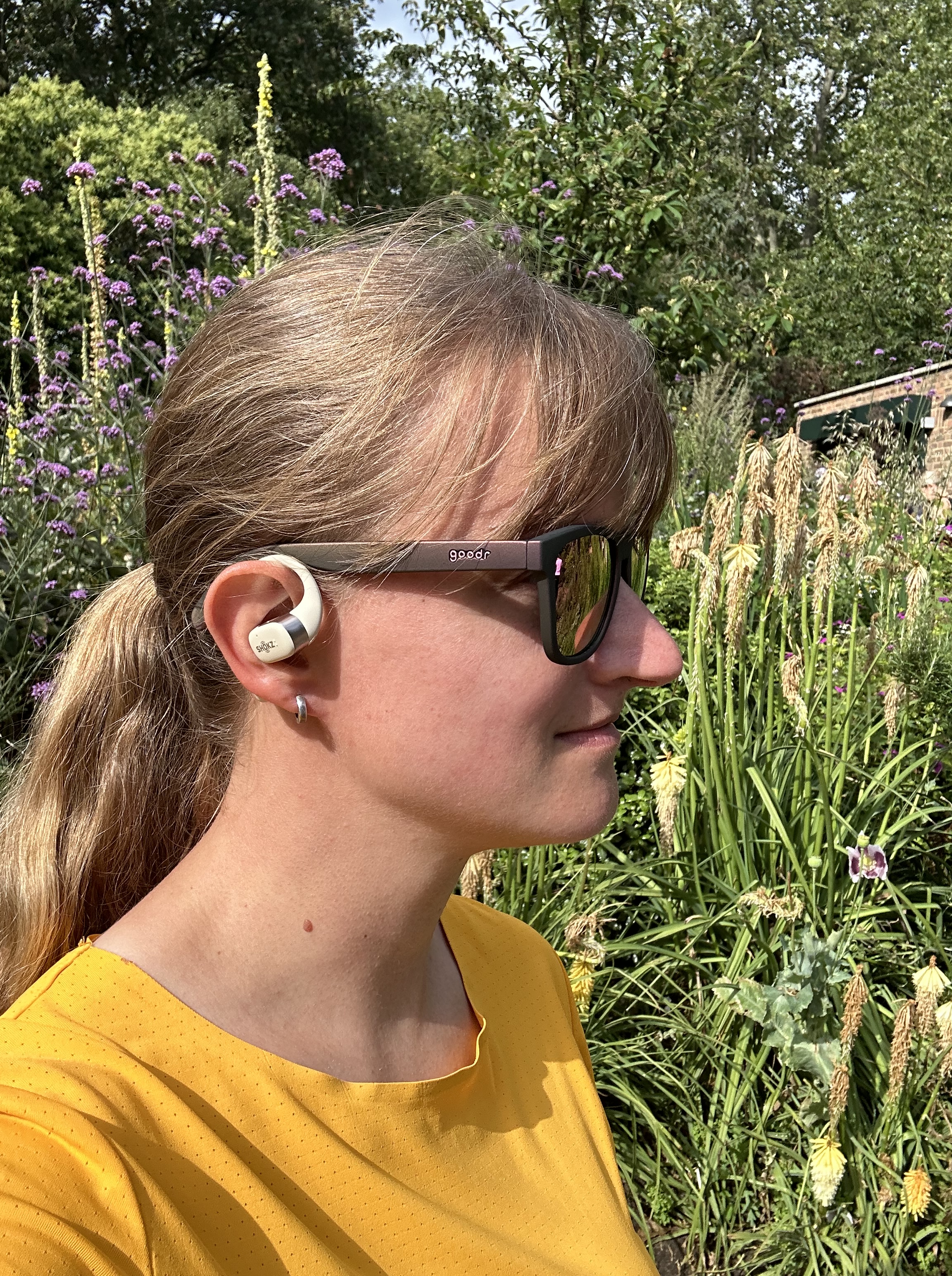
+ Design: And there is no band in the back. To be honest the band on the headphones didn’t really bother me that much, especially now that Shokz has a mini size of the headphones, but without the band you could also use the earbuds while you are lying down on your back without the band being in the way.

+ Calls: They have a microphone on each earbud, so you can use them to make calls. You can pick up the call through the earbuds as well. I’ve used them in an online meeting and I could hear everyone just fine and they seemed to be able to hear me just fine as well. And they do seem to filter out the background noise pretty well.
+ Sound leakage: They do seem to be good at preventing sound leakage so the people around you can’t tell what you are listening to.
+ App: you can use the Shokz app to change the EQ settings, see the battery status, but it also allows you to update the firmware of the earbuds.
Cons:
-Charging: The charging case has two lights, one for the earbuds and one for the charging case, which light up green if the earbuds and/or the charging case are sufficiently charged and orange when the battery starts to run low. But low seems to be still quite a bit, I think around 50% battery and you can’t check the battery status on the earbuds or the case itself. If the earbuds are connected to my phone or computer I can see the battery percentage there, or through the Shokz app, which also shows the battery percentage of the charging case. The charging case also can’t be charged wirelessly.
-Awareness: I do think your situational awareness is a bit less than with the bone conduction headphones. They are louder, even if you don’t have the volume on super high and they do sit in front of your ear canal a little bit even though they don’t go in it. But you can still hear most of your surroundings.
-Waterproof: They are less waterproof than their bone conduction counterparts. The OpenFit has an IP54 rating, while the OpenRun Pro has IP55 and the OpenRun has IP57. That’s because the OpenFit has more openings to prevent sound leakage, but water has more chance to get in through those openings.

– Touch controls: They don’t have any physical buttons, so there is no on/off button, they will turn on when you open the charging case and they will turn off when you put them back in the charging case and close it. There are no volume buttons, you have to use the buttons on the device it is connected with, whether that is your phone, your computer or your watch ect. You can play/pause your music by tapping the side of the earbuds and that also allows you to go to the next of the previous song or answer a call, but I find that it is a little tricky while you are moving about. I often have to try several times before it does what I want it to do because it’s a bit difficult to hit the right part of the earbud while in motion. With the bone conduction headphones I could hold the frame to position my hand and I could feel the actual button even if they weren’t that big. You can change the function of the tapping in the Shokz app, but it still can’t do all of it, play/pause, next song/previous song, volume up/volume down, you have to decide which ones you want to use.

-Wind: If you use them while cycling, since they stick out a bit more than the bone conduction headphones they do also catch a bit more wind. Obviously, you can turn the volume up louder on these, but that sort of defeats the open-ear purpose I feel.
-Multipoint pairing: They do not have a multipoint pairing mode. That mostly means there is no quick way to switch between devices, but you can just disconnect on one device and connect it again to another.
| Model | OpenFit | OpenRun Pro | OpenRun | OpenComm | OpenMove |
| Battery | 7 hours/28 hours | 10 hours | 8 hours | 8 hours | 6 hours |
| Water Resistance | IP54 | IP55 | IP67 | IP55 | IP55 |
| Sound | DirectPitch | 9th gen bone conduction | 8th gen bone conduction | 7th gen bone conduction | 7th gen bone conduction |
| EQ | 4+ | 2 | 2 | 2 | 3 |
| Charging time | 1 hour | 1 hour | 1.5 hours | 1 hour | 2 hours |
| Quick charging | Yes | Yes | Yes | Yes | No |
| Charging | USB-C | Magnetic | Magnetic | Magnetic | USB-C |
| Multipoint pairing | No | Yes | Yes | Yes | Yes |
| Weight | 17 grams | 29 grams | 26 grams | 33 grams | 29 grams |
| Price | €199,00 | €189,95 | €139,95 | €189,95 | €89,95 |
So, what would I use these earbuds for? I’ve been using them for running, cycling, online meetings, traveling and watching videos. You can definitely use them for running or other sports, but I think the bone conduction headphones would be more suitable for that. The bone conduction headphones will leave your ears open even more and they have a higher water resistance level than the OpenFit. I think in the future I’ll just keep using my OpenRun Pro headphones while running and cycling.

I think the OpenFit is more suitable to maybe use in a setting where you want some awareness of your surroundings, but you are not taking part in traffic in any kind of way. So, I use them with my laptop while working or watching tv shows, because it gives a better sound quality than the bone conduction headphones. I also use them during a commute where I might sit on the train or an airplane and still want to hear the announcements, but don’t have to be careful about bikes coming up behind me or anything like that. I also use them while cooking so I can listen to a podcast at the same time. And I’ve also used them during a race where the roads were closed so I could hear the spectators and the people around me.

If you are looking for a pair of open-ear headphones mostly for sports, I would go with one of the bone conduction headphones, like the OpenRun or the OpenRun Pro. But if you mostly want to use it at work or during your commute, and only occasionally want to exercise with it or if you really care about the audio quality or not having a band at the back of your head, then the OpenFit might be the right fit for you.
Depending on the situation I do really like the OpenFit and I do think DirectPitch is an interesting new technology and it will be interesting to see how Shokz will develop this technology even further in the future.
The OpenFit was provided by Shokz for this review, but all opinions are my own.
 Heart Runner Girl
Thank you for the detailed review and comparison. I got the OpenFit and enjoying them!
Thanks for this! I was tempted to upgrade my OpenRun headphones to OpenFit (mostly to get rid of the OpenRun’s loop that’s a nuisance with long hair) but since I use them primarily for running and commuting, I think I’ll stick with OpenRun.
They might have updated the app since you got yours, but two things you can do that you list in your cons:
You can do MultiPoint pairing. The settings are in the app (at least in my iPhone version).
You can control the volume. In the control settings you set what actions happen when double-tapping and press-and-hold. You can set Previous / Next, Volume Up / Down, or Voice assistant on the press-and-hold type input.
Your review is very helpful to help me understand the difference between the OpenFit and OpenRun models.